Movement: Advanced & Beta
← Back to Home · Main guide: Movement
Where the settings on this page live:
| Setting | Key | Where |
|---|---|---|
| Movement Cap Detection | enableMovementCapDetection |
Combat & Movement → Movement & Boost |
| Boost & Move Offer | enableBoostOffer |
Combat & Movement → Movement & Boost |
| Pathfind Drag Movement | pathfindDragMovement |
Ruler & Measures → Lancer Automations Ruler |
| Split Movement at Trigger Boundaries | splitMovementAtTriggerBoundaries |
Ruler & Measures → Lancer Automations Ruler |
| Debug: Path Hex Calculation | debugPathHexCalculation |
Debug → Debug Toggles |
| Debug: Movement | debugMovement |
no UI row, console only |
Most of this page needs Enable Lancer Automations Ruler (enableBuiltinSpeedProvider) on. See Movement.
Warning
The movement cap and the boost offer (the first section below) are beta. They change how dragging a token behaves in combat, so test them before relying on them. The rest of the page is not beta.
Movement cap and the offer cards
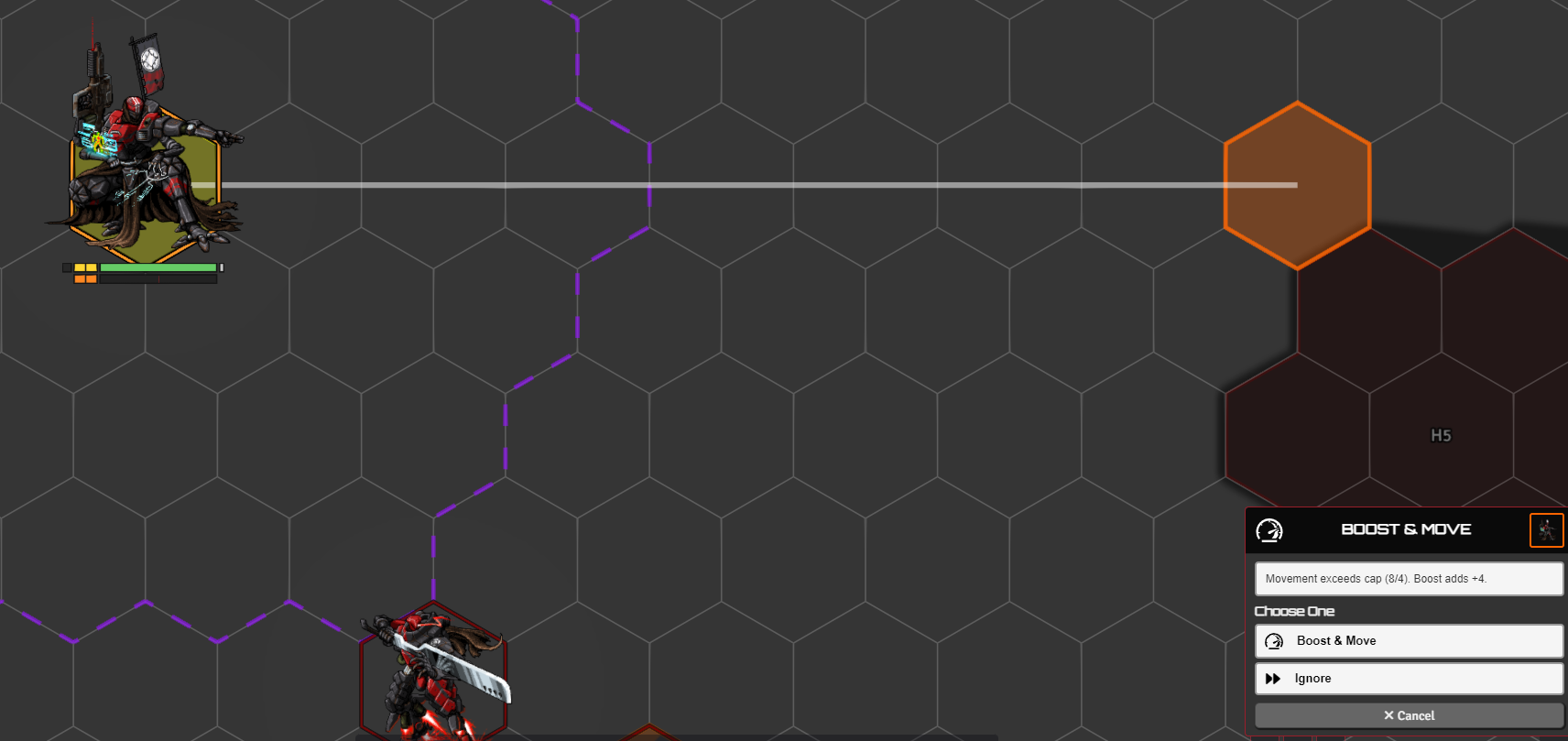
Movement Cap Detection (enableMovementCapDetection) cancels a drag that would take a combatant past its movement cap. The cap is not a snapshot taken at combat start: it is re-derived on every read from the token's current speed, its statuses (prone halves it, slow removes the boost legs, stunned and friends zero it) and any standing movement bonuses, so a mid-turn speed change moves it. What resets on a turn change is the per-turn legs, not the cap itself.
Boost & Move Offer (enableBoostOffer) is a three-way choice, No by default:
- No - no offer.
- Yes, ask first - an over-cap drag pops a card instead of just being cancelled.
- Automatic, no prompt - the same, minus the card: the first option is accepted after a short delay.
The offer does not need cap detection on. Either setting alone arms the over-cap check. The card offers:
- Boost & Move - when one Boost would cover the overage. It moves up to the cap, fires the Boost action, then moves the rest.
- Overcharge & Boost & Move - for mechs (or NPCs with an Overcharge feature) when one Boost isn't enough but two are. It moves, Boosts, Overcharges, Boosts again, then finishes the move. When the cap is already spent, it starts straight at the Boost.
If neither is enough, the move is rejected with a reminder to hold the free-movement key (the message names your bound key, not a hardcoded V). Choosing Ignore on a card runs the full move without the cap check.
Drag pathfinding
Pathfind Drag Movement (pathfindDragMovement) routes a dragged token around hostile bodies and tall terrain instead of straight through them. A live overlay shows how far it can still reach as you drag.
It is off by default, and the settings row only unlocks with both Enable Lancer Automations Ruler (enableBuiltinSpeedProvider) and Per-step Ruler Path (rulerPerStepRender) on. Press X to flip it for the current session while it is on.
Split movement at trigger boundaries
Split Movement at Trigger Boundaries (splitMovementAtTriggerBoundaries) splits a drag into sub-moves at each cell where the token crosses a trigger boundary - Terrain Height Tools, TemplateMacro, Grid-Aware Auras, or a Foundry region.
The triggers then fire as the token visually reaches each boundary, instead of all at once at the end of the move. The visible path is unchanged.
On hex grids, native regions with movement behaviors can occasionally drift the resolved path from the preview. Stabilization code softens that. The clean fix needs a Foundry source edit, see the last section.
Path hex calculation
Every move records the exact grid cells it passes through, which interception and trigger logic use to know what the token crossed. There is no setting for it, it is always on.
Debug
- Debug: Path Hex Calculation (
debugPathHexCalculation), in the Debug tab, draws those path cells on the canvas for a few seconds. - Debug: Movement (
debugMovement) logs the per-cell cost calculation and draws terrain/climb/penalty overlays during a move. It has no settings row: set it from the console withgame.settings.set('lancer-automations', 'debugMovement', true). Do not confuse it with the Debug Movement keybind of the same name in the Control tab, which is the B hold that makes one move skip automation.
For developers and self-hosted installs
Pathfinding and splits inject into the drag preview through a wrap of Token#createTerrainMovementPath, so no core edit is needed. If a modifyPlannedMovement hook fires (the old source patch), LA uses it instead and the wrap stays dormant.
The clean fix for the hex-grid path drift is one hook in Foundry's own source, so it is for self-hosted installs only (resources/app/public/scripts/foundry.mjs).
The source patch
In TokenDocument#splitMovementPath, the if (regionCheckpoint) block. Match the token-anchored cell offset so an LA waypoint already on the hex suppresses Foundry's sub-pixel checkpoint. Without it you get three dots and a cube-line divergence. Nothing in a module can stand in for it, the block has to be edited in place:
if ( regionCheckpoint ) {
  let _laRC, _laPV, _laCU;
  try {
    _laRC = this._positionToGridOffset(regionCheckpoint);
    _laPV = this._positionToGridOffset(previous);
    _laCU = this._positionToGridOffset(current);
  } catch {}
  const _laSameCellPrev = !!(_laRC && _laPV && _laRC.i === _laPV.i && _laRC.j === _laPV.j);
  const _laSameCellCurr = !!(_laRC && _laCU && _laRC.i === _laCU.i && _laRC.j === _laCU.j);

  if ( (TokenDocument.arePositionsEqual(regionCheckpoint, previous) || _laSameCellPrev) && (previous !== origin) ) {
    previous.checkpoint = true;
    pending.push(current);
  }
  else if ( TokenDocument.arePositionsEqual(regionCheckpoint, current) || _laSameCellCurr ) {
    current.checkpoint = true;
    passed.push(current);
  }
Keep the original final else and closing brace as-is.