Building NPC Automations - Worked Examples
← Back to Home · Engine guide: Automation Engine · API: API Reference
Warning
These come from my personal NPC set - teaching material, not a supported content pack. The LIDs, numbers, and balance are tuned for my own games, and some are old and may not run as-is anymore (the engine and API move on). Copy the patterns, not the literal code. See the personal activation set.
Each example teaches one engine concept, simplest first. Read Automation Engine first for the basics.
1. Insulated
What it does. Makes the NPC immune to Burn (both the Burn status and Burn damage), set up automatically the moment the token is placed.
Triggers: none (onInit only)
Note
The shipped version does the same thing with one api.ensureLinkedBonus({ items: [item], bonusData, addOptions: { duration: 'constant' } }) call, which handles the "don't add it twice" part for you and ties the bonus to the item. The manual read-then-add below is kept because it shows what ensureLinkedBonus is doing underneath.
const npcInsulatedBonus = {
    category: "NPC",
    itemType: "npc_feature",
    reactions: [{
        triggers: [],
        activationType: "none",
        onInit: async function (token, item, api) {
            if (!api || !token.actor) return;
            const bonusId = `insulated_${item.id}`;
            const bonuses = api.getConstantBonuses(token.actor);
            if (!bonuses.some(b => b.id === bonusId)) {
                await api.addConstantBonus(token.actor, {
                    id: bonusId,
                    name: "Insulated",
                    type: "multi",
                    bonuses: [
                        { type: "immunity", subtype: "effect", effects: ["burn"] },
                        { type: "immunity", subtype: "damage", damageTypes: ["Burn"] }
                    ]
                });
            }
        }
    }]
};
Tip
onInit runs once on token creation, no trigger needed. Check getConstantBonuses first so it isn't added twice, or let ensureLinkedBonus do it. Constant bonuses are invisible and persistent (see Effects & Bonuses).
2. Sapper Smoke Grenade
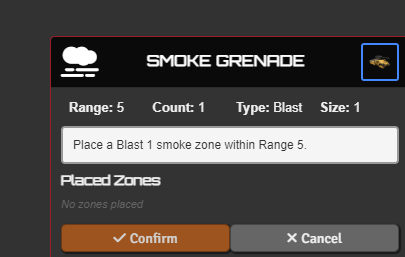
What it does. A quick action that places a Blast 1 soft-cover smoke zone within Range 5.
Triggers: onActivation
"nrfaw-npc_npcf_sapper_kit_smoke_grenade_strider": {
    category: "NPC",
    itemType: "npc_feature",
    reactions: [{
        triggers: ["onActivation"],
        triggerSelf: true,
        actionType: "Quick Action",
        onlyOnSourceMatch: true,
        autoActivate: true,
        activationType: "code",
        activationMode: "instead",
        activationCode: async function (triggerType, triggerData, reactorToken, item, activationName, api) {
            await api.placeZone(reactorToken, {
                range: 5, size: 1, type: "Blast",
                fillColor: "#808080", borderColor: "#ffffff",
                statusEffects: ["cover_soft"],
                title: "SMOKE GRENADE", icon: "fas fa-smog", centerLabel: "Smoke"
            });
        }
    }]
}
Tip
The simplest active automation: onActivation + onlyOnSourceMatch + autoActivate, then one call to placeZone. onlyOnSourceMatch is what keeps it firing for this feature only and not for every action the NPC takes. The statusEffects array applies those effects to any token inside the zone automatically.
There is no usesPerRound field on a reaction config, the engine never reads one. To limit a feature per round, either put a tg_round tag on the item and leave checkUsage on, or open activationCode with if (!await api.consumeOncePerRound(reactorToken, 'my_key')) return;. It has to go in activationCode, not evaluate, because evaluate must stay synchronous.
3. Veterancy
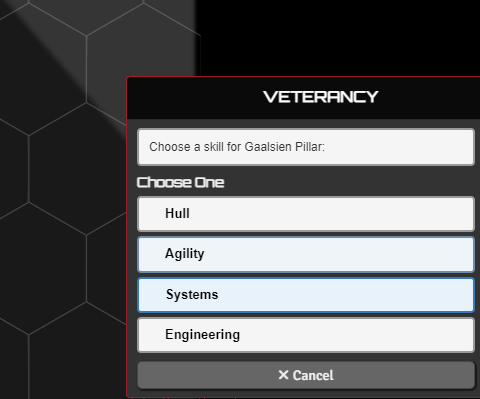
What it does. On entering combat the NPC picks a skill (Hull / Agility / Systems / Engineering) and gains +1 accuracy on that kind of check. On leaving combat the bonus is removed.
Triggers: onEnterCombat, onExitCombat
Note
Veterancy is not from my personal set. It is one of the built-in defaults (npcf_veterancy_veteran), so you already have it. The shipped version is bigger than what's below: three sub-reactions instead of two (a third on onActivation lets you re-pick mid-combat), linkBonusToItem / unlinkBonusFromItem instead of raw constant bonuses so the bonus dies with the item, and startChoiceCard instead of pickCard. What follows is the simplified teaching version. Read it for the shape, then open the real one in the Activation Manager.
const veterancyVeteranAutomation = {
    category: "NPC",
    itemType: "npc_feature",
    reactions: [{
        triggers: ["onEnterCombat"],
        triggerSelf: true,
        autoActivate: true,
        activationType: "code",
        activationMode: "instead",
        evaluate: function (triggerType, triggerData, reactorToken, item, activationName, api) {
            const bonuses = api.getConstantBonuses(reactorToken.actor);
            return !bonuses.some(b => b.id === `veterancy_${reactorToken.actor.id}`);
        },
        activationCode: async function (triggerType, triggerData, reactorToken, item, activationName, api) {
            const skills = [
                { text: "Hull", icon: "cci cci-hull", tag: "hull" },
                { text: "Agility", icon: "cci cci-agility", tag: "agility" },
                { text: "Systems", icon: "cci cci-systems", tag: "systems" },
                { text: "Engineering", icon: "cci cci-engineering", tag: "engineering" }
            ];
            const skill = await api.pickCard(skills, {
                label: "text", entryIcon: (entry) => entry.icon,
                title: "VETERANCY", description: `Choose a skill for ${reactorToken.name}:`
            });
            if (!skill) return;
            await api.addConstantBonus(reactorToken.actor, {
                id: `veterancy_${reactorToken.actor.id}`,
                name: `Veterancy (${skill.text})`,
                val: 1, type: "accuracy", rollTypes: [skill.tag]
            });
        }
    }, {
        triggers: ["onExitCombat"],
        triggerSelf: true,
        autoActivate: true,
        activationType: "code",
        activationMode: "instead",
        activationCode: async function (triggerType, triggerData, reactorToken, item, activationName, api) {
            await api.removeConstantBonus(reactorToken.actor, `veterancy_${reactorToken.actor.id}`);
        }
    }]
};
Tip
The evaluate gate stops it re-firing, pickCard shows one button per entry and returns the picked one (null on dismiss), and pairing add-on-enter with remove-on-exit keeps the bonus from lingering.
4. Dispersal Shield
What it does. Grants a friendly target in sensor range resistance to all damage for the next 1d3 attacks.
Triggers: onActivation · (also in the README)
"npcf_dispersal_shield_priest": {
    itemType: "npc_feature",
    reactions: [{
        triggers: ["onActivation"],
        triggerSelf: true,
        actionType: "Quick Action",
        onlyOnSourceMatch: true,
        autoActivate: true,
        activationType: "code",
        activationMode: "instead",
        activationCode: async function (triggerType, triggerData, reactorToken, item, activationName, api) {
            const targets = await api.chooseToken(reactorToken, {
                count: 1,
                range: 'sensors',
                includeSelf: true,
                disposition: 'friendly'
            });
            const target = targets?.[0] || reactorToken;
            const roll = await new Roll("1d3").evaluate();
            await roll.toMessage({ speaker: ChatMessage.getSpeaker({ token: reactorToken.document }), flavor: `${activationName} - Resistance charges` });
            const charges = roll.total;
            const resistances = [
                "lancer.statusIconsNames.resistance_heat",
                "lancer.statusIconsNames.resistance_kinetic",
                "lancer.statusIconsNames.resistance_explosive",
                "lancer.statusIconsNames.resistance_burn",
                "lancer.statusIconsNames.resistance_energy"
            ];
            await api.applyEffectsToTokens({
                tokens: [target],
                effectNames: resistances,
                note: `Dispersal Shield (${charges} charges)`,
                duration: { label: 'indefinite', turns: null, rounds: null, overrideTurnOriginId: reactorToken.id },
            }, {
                stack: charges,
                consumption: { trigger: "onDamage", originId: target.id, grouped: true }
            });
        }
    }]
}
Tip
chooseToken highlights valid targets in range ('sensors' reads the caster's sensor range) and disposition: 'friendly' keeps allies only. The stack is set from a 1d3 roll, and consumption: { trigger: "onDamage", grouped: true } burns one charge each time the target takes damage. When the stack hits zero the effects clear themselves.
5. Smoke Launchers
What it does. Places a Blast 2 smoke zone that persists until the start of the NPC's next turn, then deletes itself.
Triggers: onActivation · (also in the README)
"nrfaw-npc_carrier_SmokeLaunchers": {
    itemType: "npc_feature",
    reactions: [{
        triggers: ["onActivation"],
        triggerSelf: true,
        actionType: "Quick Action",
        onlyOnSourceMatch: true,
        autoActivate: true,
        activationType: "code",
        activationMode: "instead",
        activationCode: async function (triggerType, triggerData, reactorToken, item, activationName, api) {
            await api.placeZone(reactorToken, {
                range: 5, size: 2, type: "Blast",
                fillColor: "#808080", borderColor: "#ffffff",
                statusEffects: ["cover_soft"],
                expires: { on: 'ownerTurnStart' }
            });
        }
    }]
}
Tip
expires stamps the template so the module deletes it on that combat event (turns: 2 would survive one extra turn, and ownerTurnEnd also exists). No cleanup reaction, no flag bookkeeping. For state that is not a template, actor flags remain the way to carry data between reactions.
6. Moving Target
What it does. When an enemy moves within 20 of the sniper, it can interrupt that movement and fire its Anti-materiel Rifle. An unloaded rifle reloads instead and nobody is interrupted.
Triggers: onPreMove
const movingTargetSniperAutomation = {
    category: "NPC",
    itemType: "npc_feature",
    reactions: [{
        triggers: ["onPreMove"],
        triggerSelf: false,
        triggerOther: true,
        actionType: "Reaction",
        frequency: "1/Round",
        autoActivate: true,
        requireCanProvoke: true,
        checkReaction: true,
        activationType: "code",
        activationMode: "instead",
        evaluate: function (triggerType, triggerData, reactorToken, item, activationName, api) {
            const mover = triggerData.triggeringToken;
            if (triggerData.moveInfo?.isInvoluntary) return false;
            if (triggerData.distanceToTrigger > 20) return false;
            if (api.isFriendly(reactorToken, mover)) return false;
            return true;
        },
        activationCode: async function (triggerType, triggerData, reactorToken, item, activationName, api) {
            const mover = triggerData.triggeringToken;
            const rifle = api.findItemByLid(reactorToken.actor, "npcf_anti_materiel_rifle_sniper");
            if (!rifle) return;
            if (rifle.system?.loaded === false) { await api.setItemResource(rifle, true); return; }
            let responderIds = [];
            const preConfirm = async () => {
                const ask = await api.askCard({
                    title: "INTERRUPT MOVEMENT?",
                    description: `${mover.name} is moving into ${reactorToken.name}'s sights.`,
                    item, originToken: mover, relatedToken: reactorToken,
                    owner: reactorToken,
                    yesText: "Interrupt", yesIcon: "fas fa-crosshairs", noText: "Let pass"
                });
                responderIds = ask.responderIds;
                if (ask.confirmed) triggerData.startRelatedFlowToReactor(responderIds[0]);
                return ask.confirmed;
            };
            const postChoice = async (chose) => {
                if (chose || !responderIds.length) return;
                await triggerData.sendMessageToReactor({ moverTokenId: mover.id }, responderIds[0], {
                    wait: true,
                    waitTitle: "MOVING TARGET",
                    waitDescription: `Waiting for ${reactorToken.name}'s player to fire...`,
                    waitItem: item, waitOriginToken: reactorToken, waitRelatedToken: mover
                });
            };
            triggerData.cancelTriggeredMove?.(
                `${reactorToken.name} is interrupting ${mover.name}'s movement.`,
                true, api.getTokenOwnerUserId(mover), preConfirm, postChoice,
                { item, originToken: reactorToken, relatedToken: mover }
            );
        },
        onMessage: async function (triggerType, data, reactorToken, item, activationName, api) {
            const mover = canvas.tokens.get(data.moverTokenId) ?? null;
            const rifle = api.findItemByLid(reactorToken.actor, "npcf_anti_materiel_rifle_sniper");
            if (!rifle) return;
            await api.attackWith(rifle, mover ? [mover] : null);
        }
    }]
};
Tip
The classic interrupt. triggerOther: true with triggerSelf: false means it reacts to others moving, not to itself. onPreMove fires before the move runs, so cancelTriggeredMove has to be called before the first await, which is exactly what happens here: everything async lives in preConfirm and postChoice, which run after the cancel has already stuck. Setting awaitActivationCompletion would change nothing on this trigger, see Automation System.
preConfirm asks the sniper's player whether to interrupt, and fires the rifle through startRelatedFlowToReactor if they say yes. postChoice covers the other branch: the mover's player overrode the interrupt (chose === false, the move goes through), and the sniper still gets its shot. That branch delegates through sendMessageToReactor, which is what puts data.moverTokenId on the onMessage handler below. Drop the send and onMessage never fires.
The rifle is checked before any card goes out, so an unloaded sniper reloads and leaves the movement alone instead of interrupting it only to find there is nothing to fire. Note setItemResource rather than reloadOneWeapon: the latter asks which weapon to reload, which would be another prompt. Once the sniper's player has committed to the interrupt, the shot needs no second confirmation, so onMessage goes straight to attackWith.
7. Restock Drone
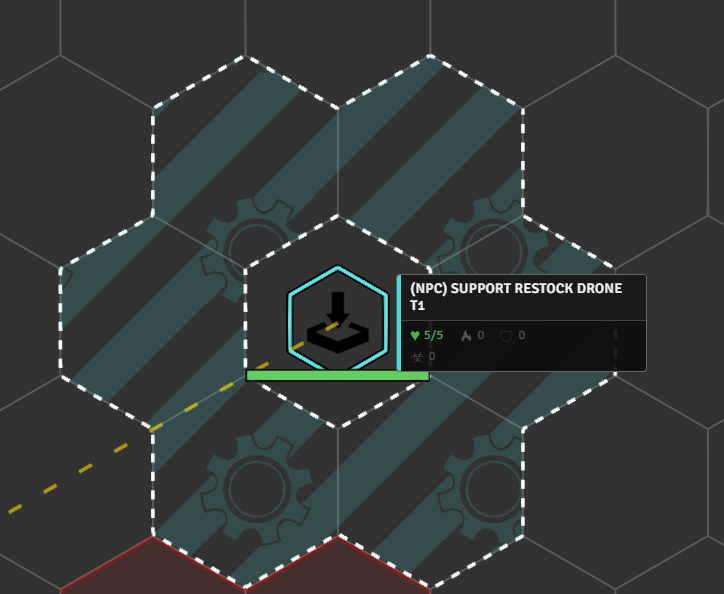
What it does. A support feature that can deploy a Restock Drone. When the drone lands it gets a healing aura. Allies that enter the aura can spend it to heal (or reload, in the rebake variant).
Triggers: onDeploy (+ onInit to register the deployable)
const restockDroneSupportAutomation = {
    category: "NPC",
    itemType: "npc_feature",
    reactions: [{
        triggers: ["onDeploy"],
        triggerSelf: true,
        onlyOnSourceMatch: true,
        outOfCombat: true,
        autoActivate: true,
        activationType: "code",
        activationMode: "instead",
        activationCode: async function (triggerType, triggerData, reactorToken, item, activationName, api) {
            const deployedToken = triggerData.deployedTokens?.[0];
            if (!deployedToken) return;
            const healAmount = api.tierValue(reactorToken, [5, 10, 15]);
            await api.createAura(deployedToken, {
                name: "Restock Drone Zone",
                radius: 1, elevationAware: true, disposition: 1,
                shape: { type: "cylinder", radius: 1 },
                macros: [{
                    mode: "ENTER",
                    function: async (token, parent, aura, options) => {
                        const lancerApi = game.modules.get('lancer-automations')?.api;
                        if (!lancerApi || !options.hasEntered) return;
                        if (!lancerApi.isFriendly(token, parent)) return;
                        await lancerApi.startChoiceCard({
                            title: "RESTOCK DRONE",
                            description: `${token.name} entered the Restock Drone's zone.`,
                            icon: "fas fa-battery-full",
                            choices: [{
                                text: `Regain ${healAmount} HP`, icon: "fas fa-heart",
                                callback: async () => {
                                    const hp = token.actor.system.hp;
                                    await token.actor.update({ "system.hp.value": Math.min(hp.max, hp.value + healAmount) });
                                    await parent.delete();
                                }
                            }]
                        });
                    }
                }]
            });
        }
    }, {
        triggers: [],
        triggerSelf: false,
        triggerOther: false,
        autoActivate: false,
        activationType: "none",
        onInit: async function (token, item, api) {
            await api.addItemFlags(item, { deployRange: 5 });
            await api.addExtraDeploymentLids(item, [
                { lid: "dep_(npc)_support_restock_drone_t1", tier: 1 },
                { lid: "dep_(npc)_support_restock_drone_t2", tier: 2 },
                { lid: "dep_(npc)_support_restock_drone_t3", tier: 3 }
            ]);
            await api.setHidePrimaryAction(item);
        }
    }]
};
Tip
Both halves of "a deployable on an NPC": onInit uses addExtraDeploymentLids to attach the deployable, and onDeploy (with triggerSelf + onlyOnSourceMatch) reads deployedTokens[0] and builds a createAura on the deployed drone. Inside the aura callback, parent.delete() removes the drone so it is consumed on use.
The second sub-reaction is onInit-only, so it spells out triggerSelf: false, triggerOther: false, autoActivate: false alongside triggers: []. triggerOther defaults to true, so leaving it out would make the entry a candidate on every trigger it happens to match. See self-deploy in Automation System.
8. Defense Net
What it does. A Full Action that immobilizes the NPC and projects a Defense Net aura granting bonuses to nearby allies. It collapses if the NPC is stunned or jammed, and (in the rebake variant) reacts to overheating and to enemies' tech misses.
Triggers: onActivation, onEndActivation, onStatusApplied (+ onHeatGain, onTechMiss in the variant)
Note
This one is a sketch, not a runnable block. buildDefenseNetAuraCallback and teardownDefenseNet are real functions in the shipped source but are not shown here, and the rebake reactions are elided. Read it for the factory shape.
function buildDefenseNetAutomation(radius, isRebake = false) {
    const reactions = [
        {
            triggers: ["onActivation", "onEndActivation"],
            actionType: "Full Action",
            onlyOnSourceMatch: true,
            triggerSelf: true,
            autoActivate: true,
            outOfCombat: true,
            activationType: "code",
            activationMode: "instead",
            activationCode: async function (triggerType, triggerData, reactorToken, item, activationName, api) {
                if (triggerType === "onEndActivation") {
                    await teardownDefenseNet(reactorToken, item, api, false);
                    return;
                }
                await api.setItemAsActivated(item, reactorToken, "Protocol", "Collapse the Defense Net");
                await api.applyEffectsToTokens(
                    { tokens: [reactorToken], effectNames: ['immobilized'], duration: { label: 'indefinite' } },
                    { defenseNetSource: reactorToken.id }
                );
                await api.createAura(reactorToken, {
                    name: 'Defense Net', radius, elevationAware: true,
                    macros: [{ function: buildDefenseNetAuraCallback() }]
                });
            }
        },
        {
            triggers: ["onStatusApplied"],
            triggerSelf: true,
            autoActivate: true,
            activationType: "code",
            activationMode: "instead",
            evaluate: function (triggerType, triggerData, reactorToken, item, activationName, api) {
                if (!api.getActivatedItems(reactorToken)?.some(i => i.id === item.id)) return false;
                return ['stunned', 'jammed'].includes(triggerData.statusId);
            },
            activationCode: async function (triggerType, triggerData, reactorToken, item, activationName, api) {
                await teardownDefenseNet(reactorToken, item, api, true);
            }
        }
    ];

    if (isRebake) {
        reactions.push(
            { triggers: ["onHeatGain"], ... },
            { triggers: ["onTechMiss"], ... }
        );
    }
    return { category: "NPC", itemType: "npc_feature", reactions };
}

const defenseNetAutomation       = buildDefenseNetAutomation(3);
const defenseNetRebakeAutomation = buildDefenseNetAutomation(2, true);
Tip
A self-deploying aura on the reactor. setItemAsActivated makes it a toggle (End Activation arrives as triggerData.endActivation). A second reaction tears it down on stun/jam. The two elided entries are the rebake's own: one collapses the net when heat hits the cap, the other retaliates with Heat damage on a tech miss. buildDefenseNetAuraCallback() returns the aura macro that applies the bonuses to allies inside.
The whole thing is a buildDefenseNetAutomation(radius, isRebake) factory, so the variant layers extra reactions onto the same base. That's how you build tiered or variant abilities without copy-pasting.
Where to go next
These eight cover the core toolbox. Patterns they don't touch, with an example to study for each. Most live in startups/itemActivations.js, keyed by LID, so search for the name in lowercase with underscores (voice_of_authority, bulky_construction). The ones marked built-in are in scripts/activations/reactions-registry.js instead.
- Prevent death (
onPreHpChange+modifyHpChange) - True Grit - Intercept destruction / clone a token (
onDestroyed) - Feign Death - Inject a bonus into someone else's check (
injectBonus, opposed checks) - Squad Leader - Add or remove extra actions on effect gain/loss (
addExtraActions) - Sniper's Mark - Lock or replace an action (
lockActorAction) - Bulky Construction, and Limited Melee Attacks (built-in) - Cancel a status or an action (
cancelChange/cancelAction) - Marker Rifle - Reply to a hit asynchronously (
onMessage) - Lightning Reflexes - Sequencer VFX in a reaction - Volley - Rainmaker
- Reroll auras (
onRoll) - Nano-Repair Cloud, Voice of Authority - General (item-less) reactions registered for everyone - Overwatch (built-in), Fall Prone (Sniper's Mark), and Break Free in
scripts/combat/grapple.js
My personal set has many more. Browse startups/itemActivations.js (or enable the set in settings) to learn from the rest.