Vision
Lancer has no fog of war or vision, but these tools bring it closer to its rules: line of sight sampled from the token's edge, tokens that block sight, and Sensor / Battlefield Awareness detection modes. Line of sight is blocked by walls. They work best with fog of war and token vision turned on, though sight-blocking tokens work fine without it.
Settings
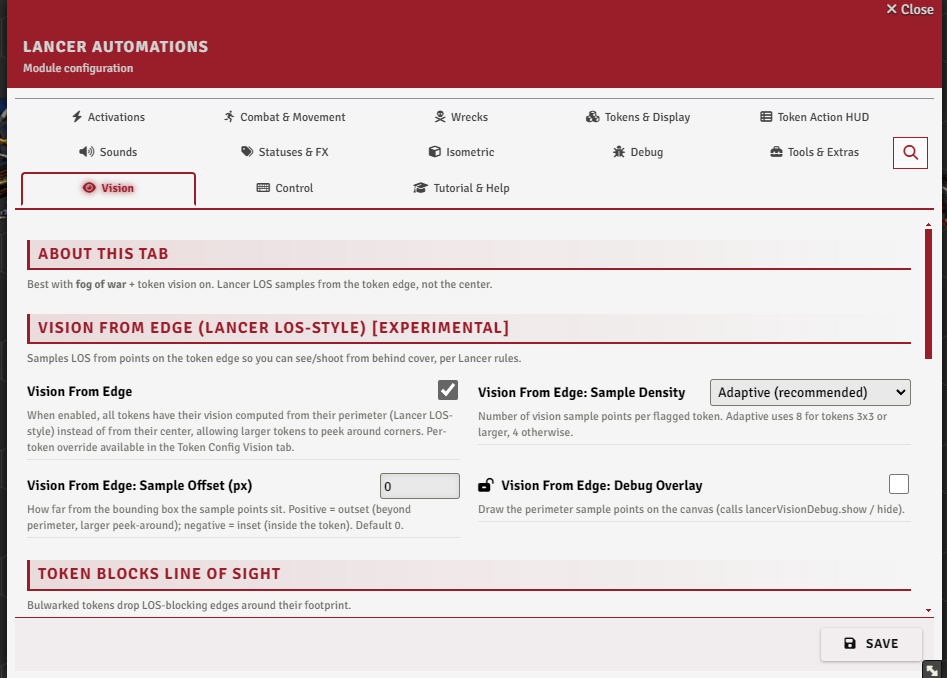
The Vision tab.
Lancer line of sight
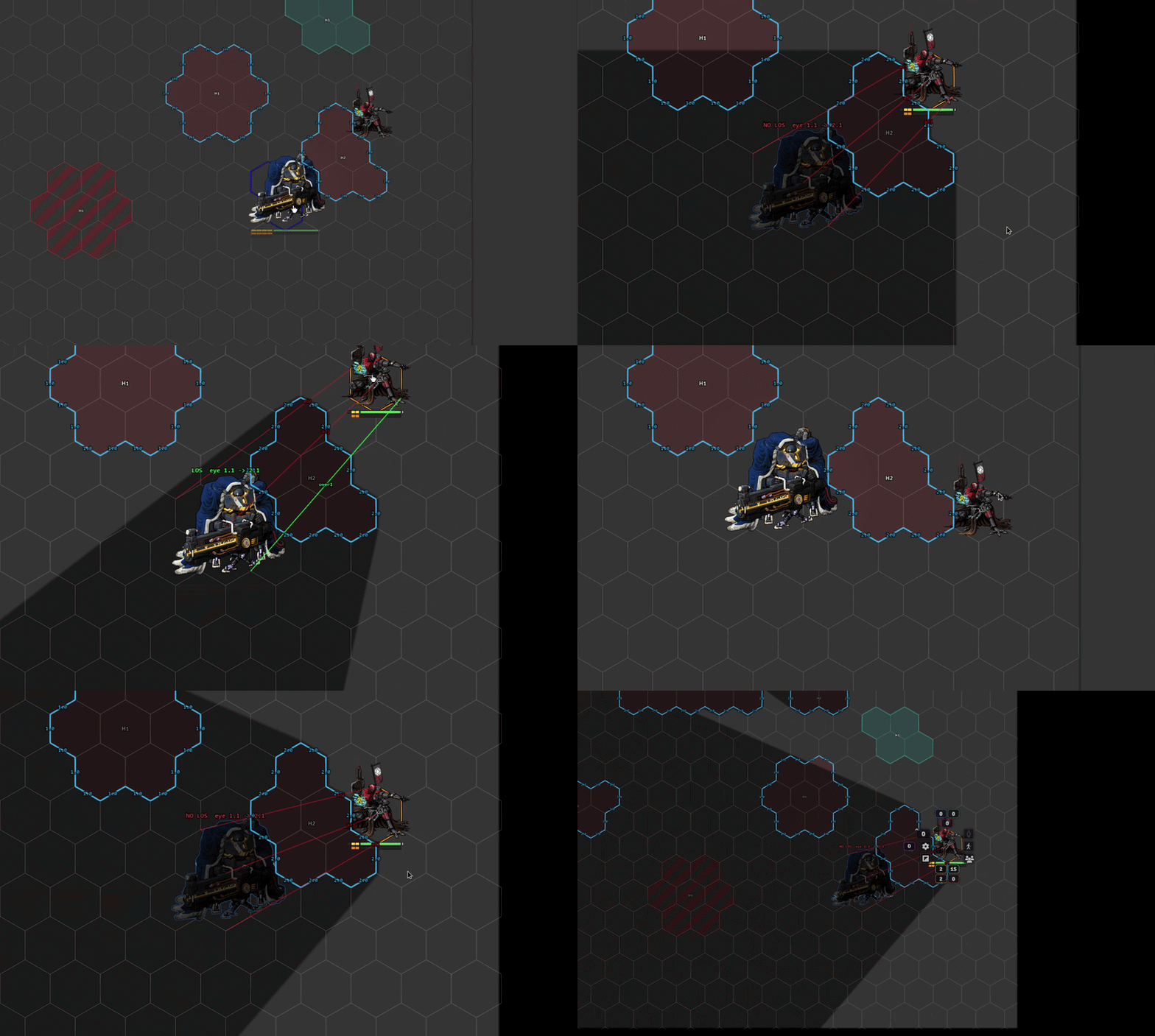
lancerLos emulates Lancer's line-of-sight rules in full: a token behind a wall stays visible if another token can see it. It's more accurate than Terrain Height Tools' (THT) own line of sight. It feeds the rest of the module too, range previews and automation included.
It reads Foundry walls, never THT terrain directly. Walls are cheaper to test and more flexible, and they let tokens that block sight, Bulwark included, count here: they act as walls of their own.
From code, hasLineOfSight runs the same test.
Setup
- Turn on
lancerLosin the Vision tab. Nothing below applies without it. - Give the scene walls. No walls, nothing blocks. Place them by hand, generate them with Terrain Height Tools, or use the auto wall generation in my fork.
- Decide which walls count. By default LA reads walls that block Sight and any wall flagged Blocks LA Line of Sight.
lancerLosFlagOnlynarrows that to flagged walls only, so you can wall a map for gameplay without blocking vision and light. See LA-only walls. - Pick a height rule.
lancerLosHeightRuleis either Discrete, which follows the size rules, or Trigonometric, which follows the real sightline so peeks over walls fade with distance. It changes results more than anything else here. - Check the result with
lancerLosDebug, which draws every tested sightline from the controlled tokens. It's heavy, leave it off in play.
LA-only walls
A wall can be flagged Blocks LA Line of Sight in its Wall Config. It then blocks Lancer line of sight, targeting and range previews without blocking Foundry vision, light or fog, whatever its Sight setting. lancerLosFlagOnly goes further: LA line of sight uses only flagged walls and ignores every other wall.
Together they let you wall a map for Lancer play without the vision and light blocking regular walls bring. The easiest setup is my THT fork: terrain types get an LA line of sight only option on their auto walls, and shape conversion can set the flag on the walls it creates. Tokens have the same option, Blocks LA Line of Sight Only in their Token Config Vision tab.
Where line of sight shows
- Attack cards -
lancerLosAttackHoverdraws Lancer line of sight when you hover a target, in place of THT's own ruler. - Advanced Measure - the eye tool, on your marks or on your targets when nothing is marked.
- Range pulses - see range pulse line of sight.
Reading the sightlines
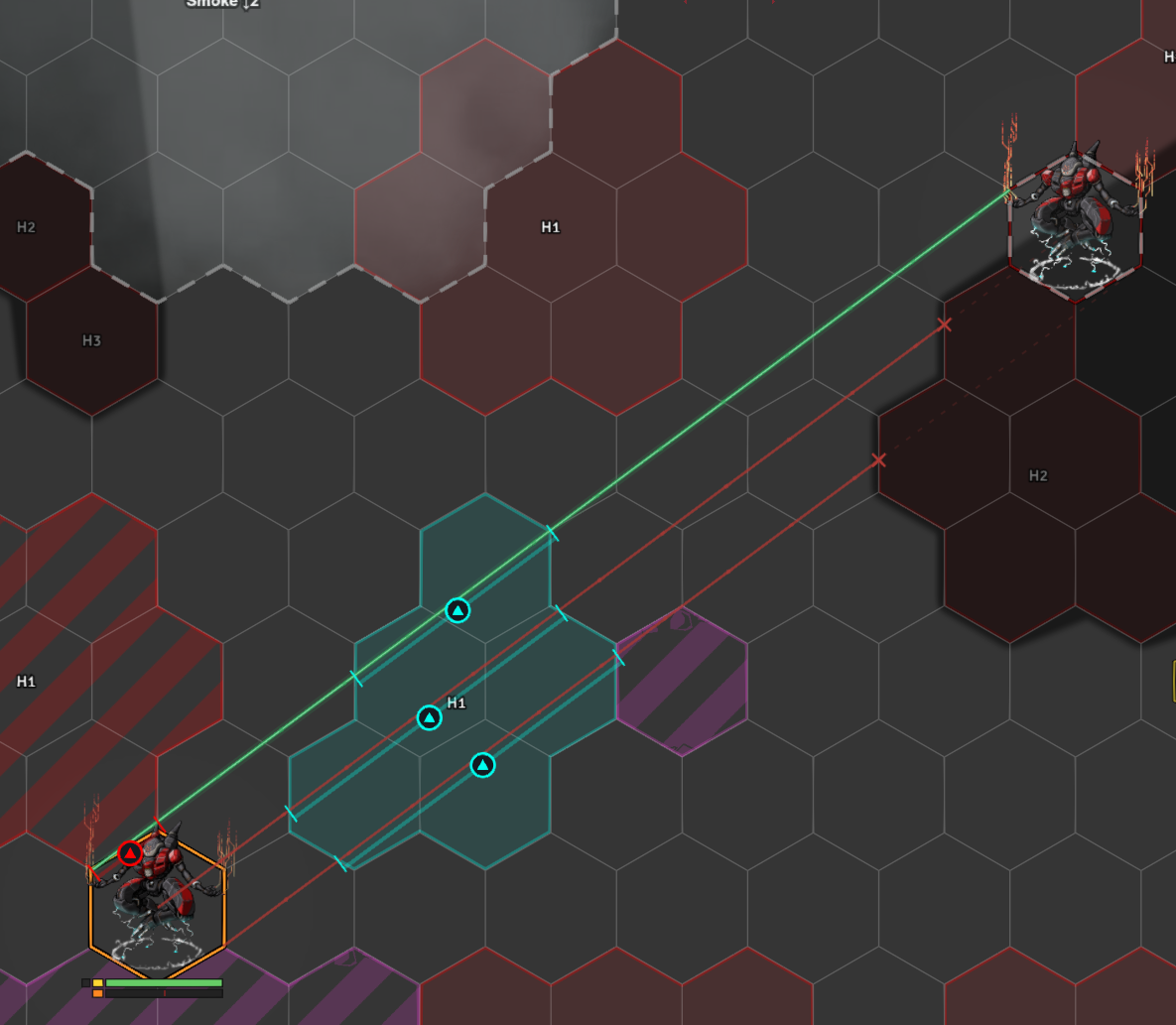
| Line | Meaning |
|---|---|
| Green | A clear line from viewer to target. |
| Red | Blocked, cut at the point that blocks it. |
| Yellow | Valid, but the three main rays all failed and it took a denser sweep of sample points to find a clear one. |
Icons along a line mark what it crosses: terrain (THT), auras (Grid Aware Auras) and templates (Template Macro).
Range pulse line of sight
rangePulseLos clips every range pulse (targeting, pickers, deploy, zones, Advanced Measure, hover previews) to what its origin token can see, with the same wall rules as Lancer line of sight. Arcing / Seeking weapons stay unclipped. Each pulse gets a Line of sight toggle, and the interactive tools take a los option.
Vision from edge
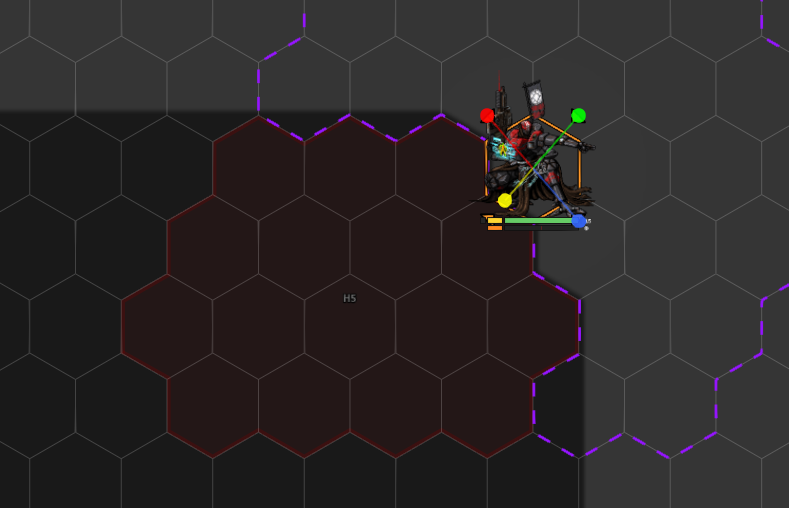
Experimental. Vanilla Foundry checks line of sight from a token's center. visionFromEdgeEnabled instead samples it from points around the token's perimeter, so a large token can see and be seen around a corner. A per-token override lives in the Token Config Vision tab.
Tune it with the Sample Density (visionFromEdgeSampleMode), which has six choices: 4 (corners only), 8 (corners + edge midpoints), 16 (dense perimeter), Token shape corners (recommended) (the default), Token shape corners x2, and Adaptive. The Sample Offset (px) (visionFromEdgeSampleOffset) moves the points off the token edge, from -50 to 50, positive outsets and negative insets. visionFromEdgeDebug draws the sample points on the canvas. With Wall Height, the samples respect elevation barriers.
Token blocks line of sight
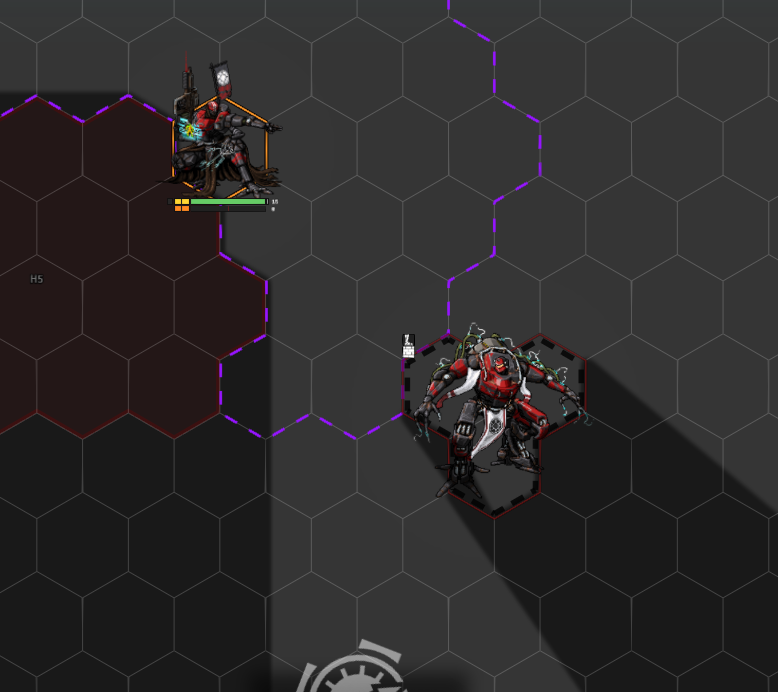
A token can be set to block line of sight around its bounding box, from a checkbox in its Token Config Vision tab. The Bulwark status turns this on automatically (bulwarkBlocksLineOfSight). It blocks even with token vision off.
With Wall Height installed it's elevation-aware: the blocking edge sits slightly below the token's own height, so a token can see over another of the same height but not over a taller one.
Token height (Wall Height)
For the elevation-aware blocking above to work, tokens need a height. Auto Token Height (Wall Height) (autoTokenHeight, in the Vision tab under Token Height (Wall Height)) sets each token's Wall-Height height to its size, so it peeks over walls and tokens of its own size.
Vehicle & Squad Height Adjustments (autoTokenHeightVehicleSquad) lowers that for vehicles and squads (my own interpretation of their heights, not an official rule), and the Apply Token Heights to All Actors button writes it onto every existing actor and token at once.
Lancer vision modes
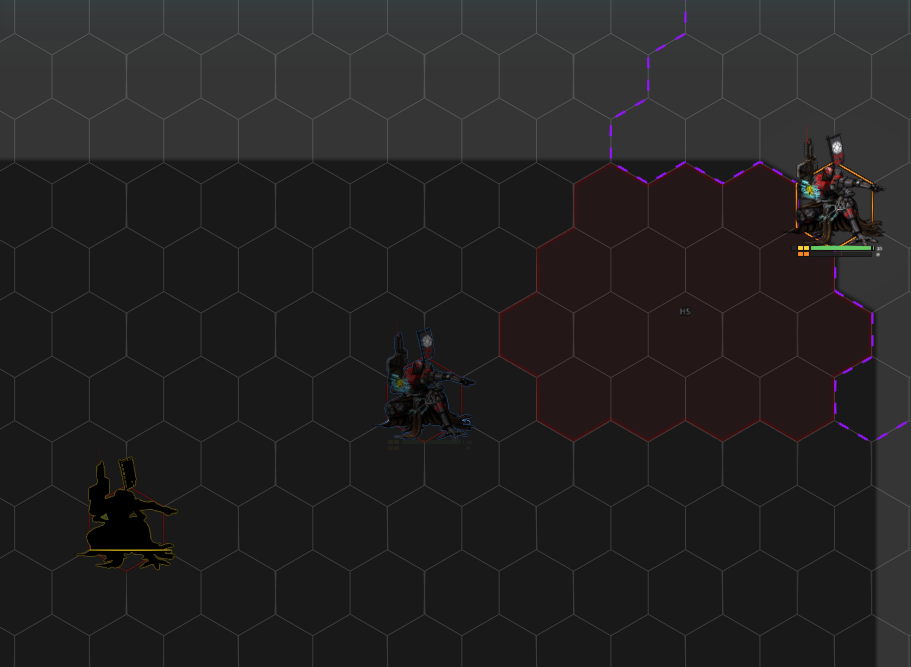
Two detection modes, auto-added to tokens on creation (lancerVisionAutoAdd):
- Sensors - blue scanlines, ranged to the actor's
sensor_range, a precise read of who's on sensors. - Battlefield Awareness - a fuzzy yellow silhouette at infinite range, for "you know something's there."
When both could see a target, Sensors win. Both are limited to combat out of the box (Sensor: Combat Only / Awareness: Combat Only, lancerSensorCombatOnly / lancerAwarenessCombatOnly, on by default), and either can read its range from the token's detection-mode entry (...UseModeRange).
A per-token Detection Visual (Token Config L.A tab) sets how a token reads: Default, Simple Object, Visible, or Ignore - any non-default also turns Sensors off for it.
Battlefield Awareness: style (lancerAwarenessStyle) sets how much of the token the overlay covers:
- Translucent - silhouette at partial opacity, the default.
- Silhouette - solid black body.
- Outline only - contour and sweep, no body. A contact outside your vision shows nothing inside it.
The sweep rides the contour in every style. Per-token Detection Visual still wins over it.
basicSightTo999 gives new tokens full basic sight, and Refresh Tokens re-applies the modes across scenes and actors.
Drag vision
While a token is dragged, its vision can be shrunk so you don't reveal new map as you move. dragVisionMultiplier sets how much (1 = full, 0 = none), read as a ratio of the current radius or a flat range depending on dragVisionMode.
Performance
Recomputing vision is expensive. Two toggles ease that on busy scenes:
visionAnimationThrottleFpscaps how often vision and light refresh while a token is moving (0 = vanilla).- Disable Vision Above N Controlled Tokens (
disableVisionAboveControlled) turns token vision off while more than N tokens are selected at once (0 = never), so batch-selecting doesn't recompute every token's sight. It defaults to 5, so it's already doing that.
Notable options
| Option | What it does |
|---|---|
| Sensor: Use Mode Range | Use the per-token detection-mode range instead of the actor sensor range. |
| Awareness: Use Mode Range | Use the per-token detection-mode range instead of infinite. |
| Blinded reduces vision | While Blinded, a token sees only one space. |